
DJI Osmo Pocket 4: Livestream Problem and Its Solution
The DJI Osmo Pocket 4 is the current flagship in DJI’s Osmo pocket gimbal line: a small camera with a 1-inch sensor, built-in stabilization, and the kind of image tools creators expect when they shoot vlogs, interviews, and B-roll on the move. It is meant for content in the field — not a studio rig, but something you can carry and start recording quickly.
Like DJI’s action cameras and drones, Pocket 4 also supports live streaming. In the camera that path goes over RTMP — the same way many people reach YouTube, and the same way a studio often pulls a feed from the field.
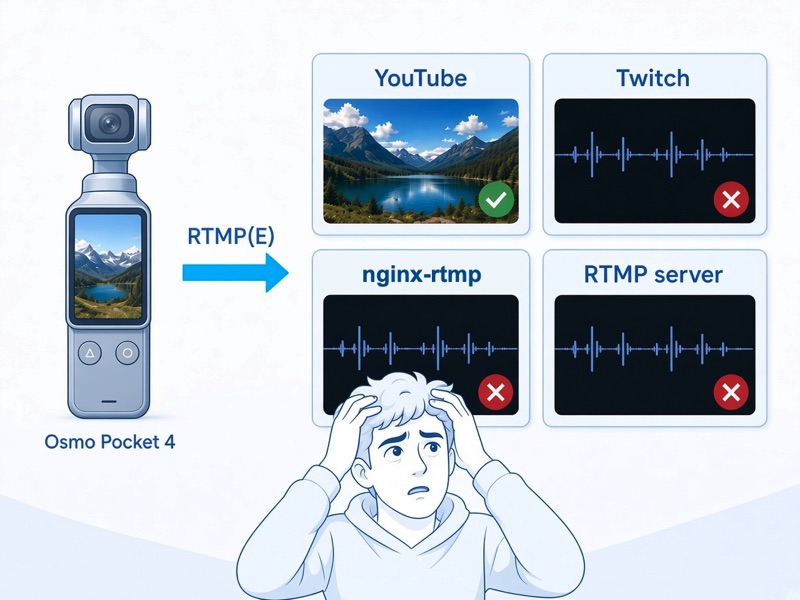
In practice, live streaming from Pocket 4 does not always look the way it did on older pocket cameras. For many users the first test on their own server goes like this: the connection succeeds, audio is fine, and the video stays black. Start a YouTube Live stream with the same camera, and the picture is often normal. That gap is confusing until you know what the Pocket 4 is actually sending.
Below is a short explanation of what goes wrong on a livestream and a practical way to receive the feed in a Windows studio.
The livestream problem in one sentence
On Pocket 4 the live video is HEVC, carried as RTMP Enhanced (RTMP-E). A receiver that only expects classic live RTMP with H.264 may connect happily and still never show video.
The camera is not “broken.” The publish URL still looks like ordinary RTMP (rtmp://host/app/stream-key). The video codec inside the FLV wrapper is what changed.
What people describe
Typical symptoms when they try to livestream:
- the session stays up
- sound is present
- picture is black, or the player never opens a video track
- YouTube Live shows video; Twitch, a typical nginx-rtmp server, and most other destinations people try do not
Others have written about the same experience on Reddit.
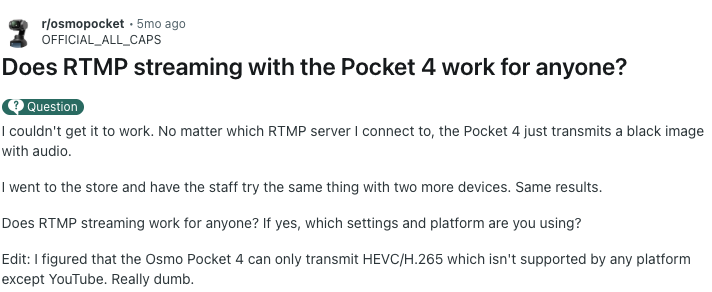
In r/osmopocket , a Pocket 4 owner reports a black image with audio on every server they tried for live streaming — including three cameras checked in a store. In an edit they note the camera sends HEVC/H.265 and that most destinations they tried did not show video (YouTube did).

The same question appears under a Pocket 4 unboxing in r/dji : black image, sound only, no matter where they connect.
Why many live destinations show a black frame
For a long time, live RTMP in the field meant H.264 (FLV codec id 7). Pocket 4 uses HEVC in an RTMP Enhanced session. Receivers built only for the older FLV path — common nginx-rtmp setups, older GStreamer flvdemux, generic “RTMP in” tools — may ignore the video tag they do not recognize. Audio passes through; video does not.
YouTube’s live ingest already understands HEVC on RTMP, which is why Pocket 4 → YouTube often looks fine. Pocket 4 → Twitch, nginx-rtmp, or a generic self-hosted ingest usually does not.
Pocket cameras still do not offer SRT for live contribution. They use RTMP, and on Pocket 4 that live path carries HEVC. Tweaking bitrate alone rarely fixes a codec mismatch.
The solution: receive the livestream in the studio
SRT Mini Server 2.7 and later accepts RTMP Enhanced with HEVC on the built-in RTMP server, including live streams from the DJI Osmo Pocket 4. The camera publishes to the studio PC; from there the feed behaves like any other line — multiview, decode to NDI or SDI, record, or hand off to the rest of the workflow.
This sits alongside the older H.264 RTMP path described in RTMP inside SRT Mini Server (GoPro, drones, legacy encoders). Pocket 4 is the HEVC livestream case.
How to connect
The line’s Stream ID is the RTMP stream key. The RTMP listen port is rtmp_port in Advanced Settings.
Enable the RTMP server in SRT Mini Server (default port 1935, unless you changed
rtmp_port).Use the line’s stream id as the stream key when you set up live streaming on the camera.
Publish to:
rtmp://IP:1935/live/STREAM_IDExample:
rtmp://192.168.1.33:1935/live/streamABC123If the PC has no public IP, use RTMP Proxy the same way as for other RTMP cameras. (more »)
Versions before 2.7 receive classic H.264 RTMP only. For Pocket 4 live streaming you need 2.7+.
Where it helps
A Pocket 4 is easy to carry: a reporter on LTE, a second angle at an event, a tight space where a backpack encoder is overkill. Once the studio can receive RTMP-E with HEVC, that small camera becomes a live contribution source instead of a YouTube-only gadget.
Download SRT Mini Server 2.7 (21-day trial). Release context: Overview of SRTMiniServer Version 2.7 .
GaraninApps Team — srtminiserver.com