
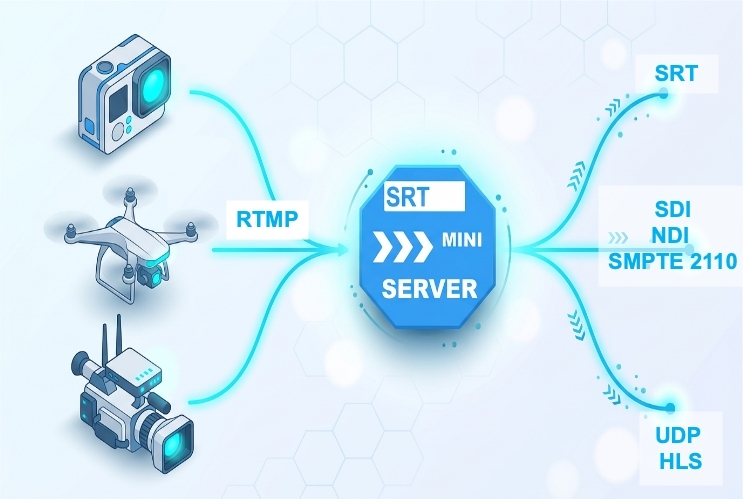
RTMP is often seen as a relic of a bygone era — Adobe Flash is long gone, and the protocol dates all the way back to the early 2000s.Nevertheless, in 2025, RTMP is more alive than many of its competitors. It is supported by almost all hardware and software encoders, and YouTube Live, Twitch, and thousands of other platforms work through it. Giving up RTMP in a production infrastructure is impossible — too much depends on it.
SRTMiniServer was originally created as a server for the SRT protocol, but in the real world, signal sources do not exist in a vacuum. Equipment at one site only supports RTMP, equipment at another works via SRT, and NDI connects the internal studio network. To avoid building a zoo of separate converters, SRTMiniServer has built-in full support for RTMP — both for receiving signals and for Proxy mode to operate without a public IP.
Additionally, SRTMiniServer supports receiving RTMP in both Pull and Push modes.
Why we added RTMP to SRT Mini Server
Note that RTMP remains the only streaming protocol for entire classes of devices.
Hardware encoders. A huge number of professional and semi-professional hardware encoders, including previous models of Teradek, LiveU, Vidiu devices and many others, support RTMP as their primary (and often only) transmission protocol.
Cameras with built-in streaming. Many cameras widely used in production today — Sony, Panasonic, JVC — no longer receive new firmware with SRT support. However, the RTMP streaming function in them exists and works. Replacing the camera fleet just for the sake of a protocol is expensive and impractical.
Action cameras. GoPro, DJI Osmo Pocket 3 and similar devices designed for extreme shooting can only stream via RTMP. SRT support is not expected from them — manufacturers target a mass audience, for which RTMP is sufficient.
Drones. DJI drones and other manufacturers with built-in streaming capabilities also transmit video exclusively via RTMP.
This creates a characteristic picture: devices designed for field and extreme shooting — precisely the ones that often operate under unstable communication channels where SRT would be especially useful — only support RTMP. This is why the task of "receiving RTMP and transmitting it further via SRT" has become one of the key functions of SRTMiniServer.

How RTMP is processed by the SRTMiniServer
SRTMiniServer receives an RTMP stream as an RTMP server — meaning the encoder or program connects to SRTMiniServer using the rtmp://address:port/live/stream_key command, and the server accepts this stream. No separate software is needed: just enter the server address and stream key in your encoder settings.
How it works internally. As soon as an RTMP packet arrives at SRTMiniServer, it is converted into an SRT packet. From that moment on, the SRTMiniServer works with the stream as if it had originally been received via SRT. The conversion operation itself is very cheap in terms of resources, but it unlocks all the functionality implemented for SRT streams: routing, conversion to NDI, distribution via SRT, participation in CrossLine, and everything else. In other words, for SRTMiniServer there are no "second-class" streams — after reception, an RTMP source becomes a full-fledged SRT stream.
Once the RTMP stream is received, SRTMiniServer processes it on par with any other incoming stream:
- displays it in multiview alongside SRT and other sources;
- decodes and outputs to NDI for further routing within the studio;
- distributes via SRT to one or more recipients;
- can participate in CrossLine — redirecting the stream to the return channel of another line.
RTMP Proxy: receiving a stream without a public IP
Classic RTMP reception assumes that the receiving server is accessible via a public address: the encoder connects to the server itself. But what if the server is behind NAT or a mobile internet connection?
For this purpose, SRTMiniServer has an RTMP Proxy mode. The principle is the same as with SRT Proxy: the server establishes an outgoing connection to an intermediate cloud node (proxy), and through this node, the encoder on the public side delivers the stream. Thus, SRTMiniServer receives an RTMP stream even while behind CGNAT or a dynamic address.
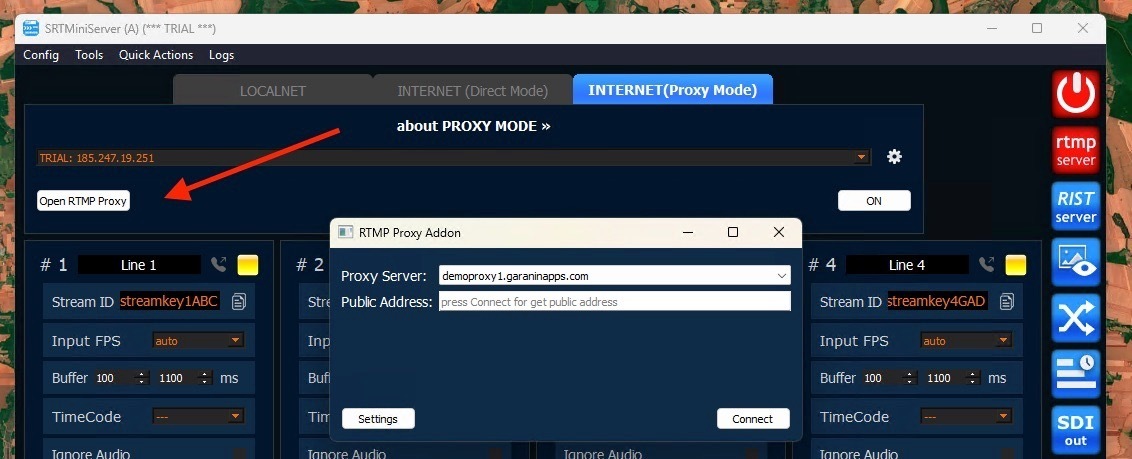
RTMP Proxy is configured in the same interface section as proxies for SRT and RIST. Starting from version 2.6.3, the RTMP Proxy button has been moved to a common tab with the list of all proxies — finding and activating it has become faster.
Conclusion
RTMP support in SRTMiniServer is a pragmatic response to reality: a huge amount of equipment and software still speaks the RTMP language. The built-in RTMP server and RTMP Proxy make it possible, without additional converters, to integrate such sources into a modern SRT infrastructure — whether it's an encoder without SRT support, a mobile application, or an action camera on an extreme sports enthusiast's helmet.
GaraninApps Team — srtminiserver.com